Summary: This article explains how Raccoon Stealer infects business endpoints, steals credentials and browser data, and how organizations can detect, remove, and prevent infections.
Attackers don’t always need advanced exploits to break into a company’s systems. Sometimes, all they need is the right set of stolen credentials. Raccoon Stealer, one of today’s most widespread infostealer malware families, is designed specifically for that job: quietly harvesting business logins and sending them to attacker-controlled servers.
This guide explains how Raccoon Stealer works, how it enters corporate environments, what data it steals, and how you can detect and stop it. You’ll also see how NordStellar’s threat exposure management platform helps reduce the risk of credential theft, MFA bypass attempts, and follow-on attacks, such as account takeover.
Key takeaways
Raccoon Stealer collects business logins, cookies, browser data, payment information, and crypto wallets.
Infostealer malware spreads through phishing, fake installers, cracked software, malvertising, drive-by downloads, and weak endpoint security.
Signs of infection include unusual network traffic, login anomalies, browser issues, and suspicious processes.
Businesses should isolate infected devices, reset credentials, investigate for misuse, and patch exploited weaknesses.
Strong security hygiene, MFA, patching, network controls, and NordStellar’s attack surface management help prevent infostealer infections, while its data breach and
dark web monitoring capabilities help reduce impact and limit escalation when stolen data appears online.
What is Raccoon Stealer?
Raccoon Stealer—also known as Raccoon infostealer malware—is a credential-harvesting tool that targets business endpoints and personal devices. It first appeared in 2019 and quickly became popular among cybercriminals due to its simplicity, reliability, and low entry cost.
Why it matters for businesses
Raccoon Stealer is built to collect login information, cookies, autofill data, browser files, crypto wallets, and application credentials. Distributed as a malware-as-a-service subscription, it gives even inexperienced attackers access to regular updates, new modules, and operator support.
Stolen files often lead to account takeover, session hijacking, cloud compromise, and deeper infiltration into internal systems. Because the infostealer malware blends into normal background activity, many early signs go unnoticed. Cybercriminals then use the harvested information for immediate access, resale, or as a foothold to deploy additional malware such as loaders, backdoors, or ransomware.
How Raccoon Stealer gets into business systems
Raccoon Stealer spreads through several common attack vectors that businesses should closely monitor.
Phishing emails. The most frequent delivery method. Messages may include malicious attachments, links to infected websites, fake invoices, bogus software-update prompts, or impersonation of internal services.
Drive-by downloads. Attackers compromise legitimate websites or build fake ones that silently trigger malicious downloads when a user simply visits the page.
Fake installers and cracked software. The stealer often hides inside cracked software bundles, browser extensions, free utilities, and counterfeit versions of popular corporate tools. Many of these are promoted through malicious ads.
Malvertising. Cybercriminals buy ad placements to distribute infected installers. Clicking the ad redirects users to a malicious site that drops the payload.
Weak passwords and poor endpoint security. Attackers commonly pair Raccoon Stealer with brute-force or password-spraying tools. Once access is gained, the infostealer is deployed as a second phase.
Outdated browsers, plugins, and software. Unpatched systems expose vulnerabilities that threat actors exploit to deploy the stealer silently.
Unpatched operating systems. Legacy systems and outdated OS builds remain an easy entry point, making exploitation faster and simpler—risks that NordStellar’s
attack surface management helps organizations identify and reduce.
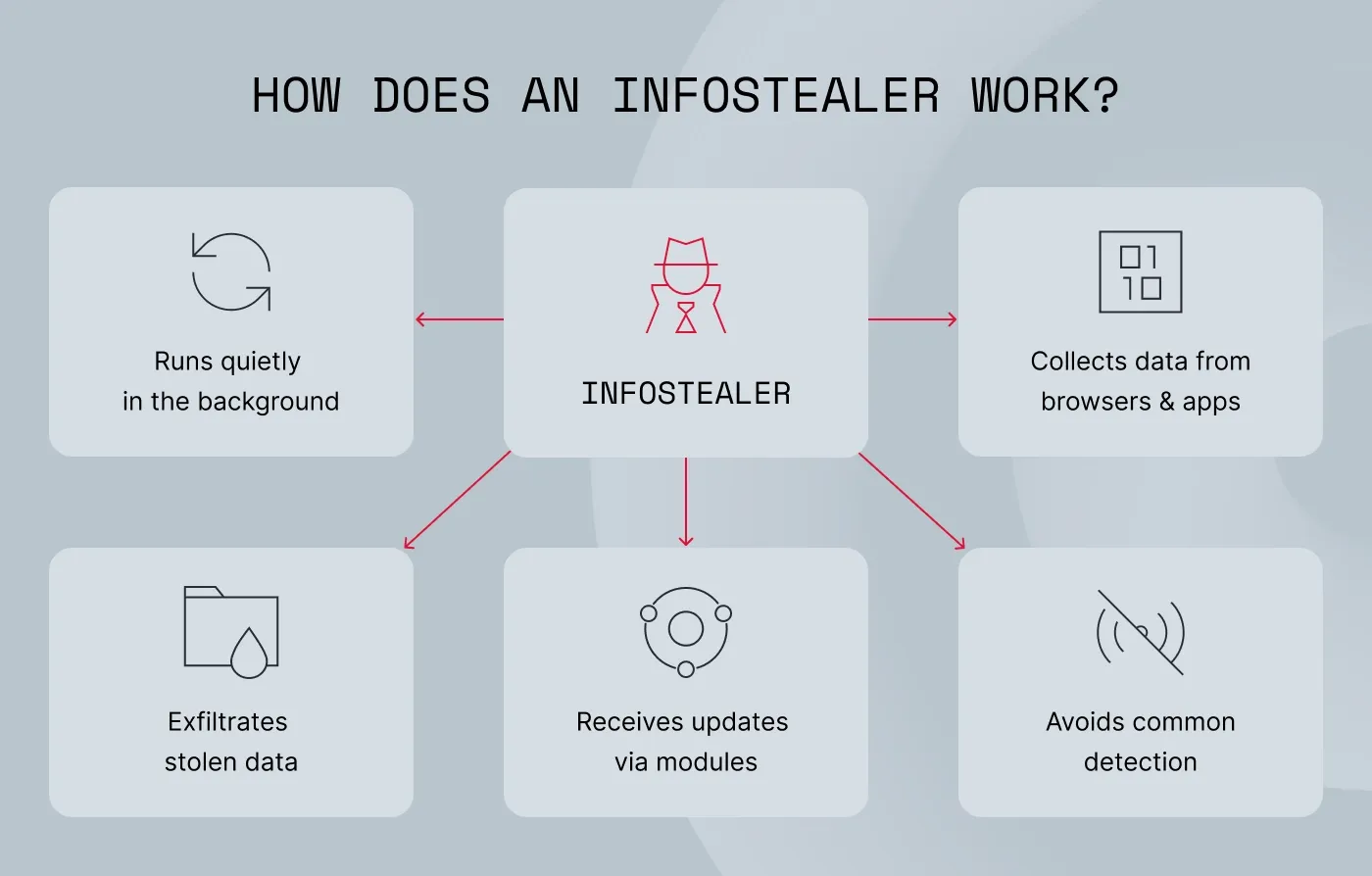
How Raccoon Stealer works on an infected device
Once inside the system, the malware immediately begins collecting high-value data while staying out of sight. How?
It runs quietly in the background. There are no pop-ups or user-visible windows—the stealer starts silently and blends into normal activity.
It collects data from browsers and applications. Once active, the stealer digs through browsers, VPNs and email clients, password managers, and crypto wallets. It quietly scoops up logins, cookies, autofill details, payment info, and any other stored data attackers can use to impersonate users.
It exfiltrates stolen data. Raccoon Stealer compresses harvested data into archives and sends them through HTTP POST requests to command-and-control servers. The transfers usually happen at irregular intervals to avoid detection.
It receives updates via modules. Because it is sold via subscription, attackers receive new modules, expanded browser-targeting capabilities, and evasion improvements on a regular basis.
It avoids common detection. Lightweight execution, process injection, and a minimal footprint help it evade basic antivirus tools. More advanced solutions—such as
NordStellar malware detection—are better at identifying infected devices early.
Business data most at risk
On corporate endpoints, the malware targets information that enables threat actors to achieve a deeper compromise:
Work login credentials: Email accounts, SaaS apps, and corporate portals.
Cloud service access: AWS, Azure, GCP, internal dashboards, and third-party integrations.
VPN and remote access credentials: Allow attackers to bypass perimeter controls entirely.
Financial and payment data: Accounting tools, payment processors, and stored cards.
Stolen files commonly appear on dark web marketplaces, often mixed with logs from other infostealers, such as RedLine Stealer and Lumma Stealer. Dark web and data breach monitoring can help you identify exposed credentials early and prevent account takeover.
Indicators of a Raccoon Stealer infection
Because Raccoon Stealer is built to operate quietly, recognizing early warning signs is critical to slimiting the damage. The following indicators can help your security team spot suspicious behavior before attackers fully exploit stolen data.
Strange outbound traffic
Unusual outbound connections to unknown or low-reputation IP addresses are one of the earliest signs of Raccoon Stealer activity. The malware frequently generates exfiltration requests to command-and-control servers to upload stolen files, often at random times. When these requests originate from endpoints that normally have predictable network behavior, it’s a strong indication of compromise.
Browser problems
Raccoon Stealer interacts heavily with browser components, which can cause glitches for end users. You may notice missing cookies, disabled autofill, or saved passwords that are no longer visible. Extensions may also malfunction because the malware is extracting or modifying browser data.
Login anomalies
Compromised credentials often lead to sign-ins from new devices or geographically improbable locations. These anomalies may initially appear as isolated events, but they typically follow the timeline of data exfiltration. If attackers use stolen session cookies, they may sign in, bypassing MFA entirely and making anomalies even more suspicious.
Odd credential use
Frequent failed logins, unexpected password reset prompts, or unexplained MFA push notifications can signal that attackers are testing stolen files. These events often spike shortly after the stealer sends data back to its operators. Even if these access attempts look random, treat them as coordinated activity linked to compromised credentials.
Unknown processes
Raccoon Stealer commonly uses randomly generated filenames or temporary executables to blend into the system. Any unfamiliar process running from temp folders, AppData, or unusual directories is worth investigating. These processes often exhibit network activity or file compression behavior that differs from legitimate software.
Slow system performance
The malware collects browser data, logs, and files, which can momentarily increase CPU and disk usage during the aggregation phase. Systems with limited resources may show noticeable lag or freezing while the stealer zips stolen files. Though the slowdown is temporary, it’s a strong clue when combined with other signs.
EDR/XDR alerts
Advanced security tools (EDR/XDR) often flag suspicious behavior even when signature-based detection fails. Alerts may include unusual background processes, unexpected system changes, or irregular network patterns. While one warning may be unclear, multiple alerts often point to an ongoing infostealer infection.
Identifying these signs early lets you to act fast—before cybercriminals dig deeper or sell your files.
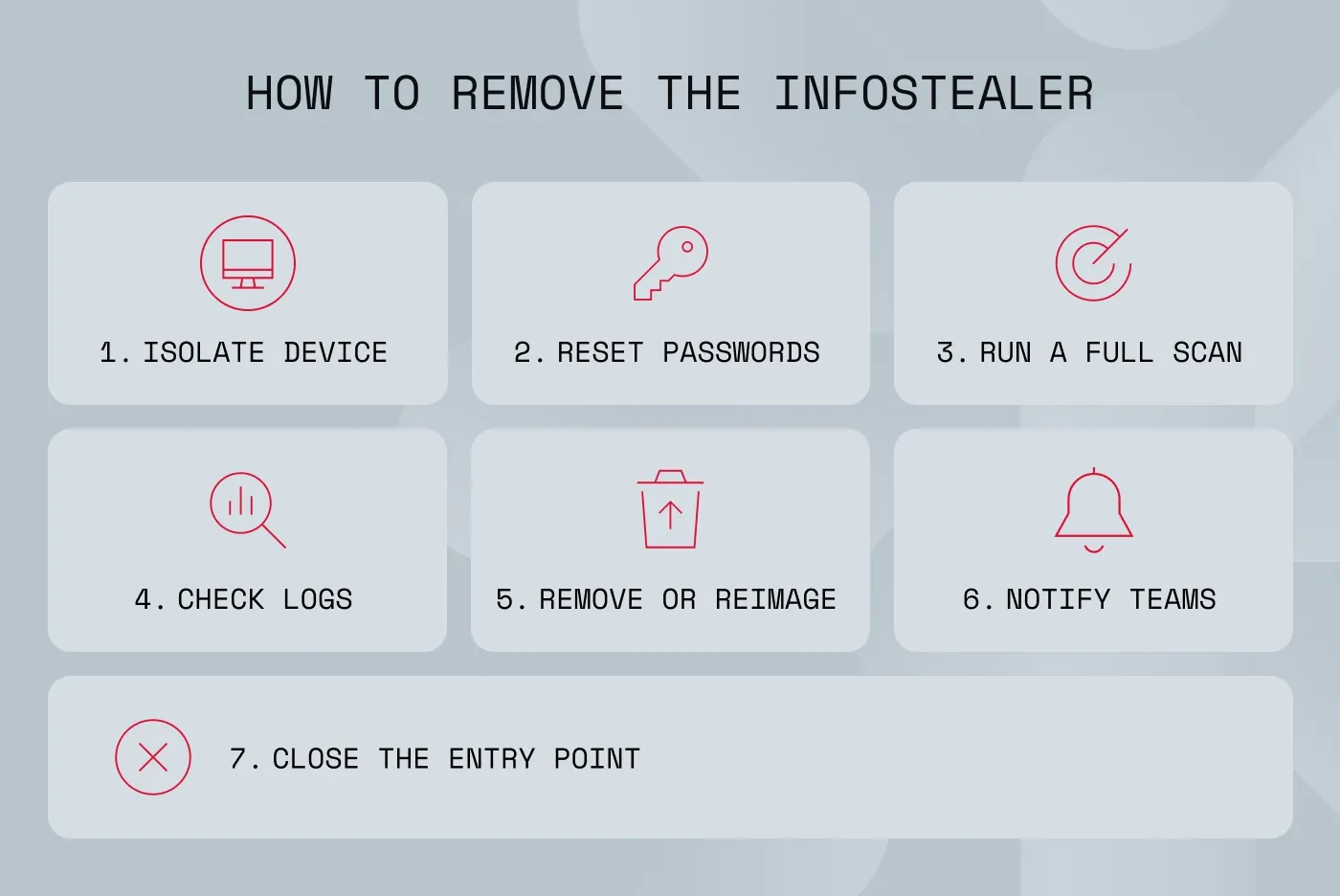
How to remove Raccoon Stealer
Once you confirm or strongly suspect an infection, a rapid and structured response is essential to contain the threat, prevent further data loss, and restore a secure environment.
1. Isolate the infected device
First cut off the endpoint from internal and external networks to halt further exfiltration. Isolation prevents the attacker from receiving additional stolen files or issuing new commands. It also protects the rest of the environment from lateral movement.
2. Reset exposed passwords
Assume that any credential stored in the browser—passwords, cookies, tokens, and autofill data—has been harvested. Resetting all affected logins is essential to prevent account takeover or unauthorized access. Prioritize cloud apps, email, VPN, and administrative accounts as these offer the most leverage to attackers.
3. Run a complete system check
A full scan with enterprise-grade antivirus and EDR tools helps identify Raccoon Stealer helper files, persistence mechanisms (files hidden in system folders to ensure the malware restarts every time you reboot your computer), and lateral movement artifacts. Because Raccoon Stealer often arrives alongside other malware, a deep inspection is necessary. Review EDR telemetry for suspicious behavior patterns tied to exfiltration or process injection.
4. Investigate logs
Review authentication logs for unusual sign-in attempts, password reset events, or impossible travel logins (a specific type of security alerts triggered by monitoring systems when a user’s account is accessed from two geographically distant locations). Check for session hijacking attempts, suspicious HTTP POST transmissions, or any anomalies in cloud service logs. Investigating these patterns helps determine the scope of the incident and whether attackers established deeper access.
5. Remove the malware or reimage
If removal results are uncertain, a complete system reimage is the most reliable remediation method. Reimaging ensures that no hidden persistence mechanisms or secondary payloads remain. It also avoids the risk of partial cleanup, leaving artifacts that can re-activate later.
6. Notify internal teams
Security, IT, and relevant business units need to be informed promptly so they can assist with remediation. Alert departments relying on affected accounts about possible disruptions or misuse. Early communication reduces internal risk and ensures coordinated response actions.
7. Fix the entry point
Determine how the malware entered—whether via phishing, vulnerable software, malicious installers, or browser exploitation—and close that gap. Apply patches, strengthen email filtering, harden browser policies, or improve access controls depending on the root cause. Without addressing the original vector, reinfection or similar incidents are highly likely to happen again.
Following these steps helps ensure the infostealer is fully removed and prevents attackers from using the same weakness again. Strengthening defenses afterward is just as important as the cleanup.
Related articles

Anastasiya NovikavaSep 30, 20257 min read
How to protect your organization from Raccoon Stealer malware
Preventing infostealer infections requires a layered approach.
Use MFA and strong password rules. Enforcing MFA and password policies significantly reduces the value of stolen credentials.
Apply network access controls. Implement segmentation and role-based access rules so that users and devices can only reach the systems they need.
Manage browsers effectively. Control browser extensions, enforce allowlists, and block untrusted add-ons or tools.
Deploy strong email filtering. Advanced email security helps stop phishing attempts, malicious attachments, and harmful URLs before they reach employees.
Patch vulnerabilities. Updating operating systems, browsers, plugins, and applications closes the security gaps that infostealers frequently exploit. NordStellar’s
attack surface management solution—including use cases such as
external vulnerability scanning—helps organizations identify exposed external assets and prioritize remediation based on what attackers can actually see and target.
Use malware detection solutions. Behavior-based detection increases your chances of catching stealthy malware like Raccoon Stealer before it exfiltrates sensitive data.
Train your employees. Regular security awareness programs help staff identify phishing emails, malicious installers, and other common infostealer delivery vectors. Well-trained employees are one of the strongest defenses against social engineering–driven infections.
Monitor for stolen data. Infostealer operators often upload logs to dark web forums, marketplaces, or Raccoon Stealer Telegram channels.
NordStellar’s data breach scanner helps organizations detect when their data—including logins and stolen session cookies that could be used to bypass MFA— appears in these sources so they can take rapid action to
prevent account takeover,
session hijacking, or internal misuse.
See your risks clearly, and stop infostealers early. Try NordStellar for free to view your business environment through an attacker’s eyes.

Agnė Srėbaliūtė
Senior Creative Copywriter
Agne is a writer with over 15 years of experience in PR, SEO, and creative writing. With a love for playing with words and meanings, she crafts content that’s clear and distinctive. Agne balances her passion for language and tech with hiking adventures in nature—a space that recharges her.